



The Overnight GPU Price Hike: What Just Happened?
If you’ve been keeping even half an eye on the PC hardware market, you’ve probably noticed how fickle graphics-card pricing has become. A GPU can sit at one price for weeks, only to wake up the next morning carrying a considerably heavier price tag.
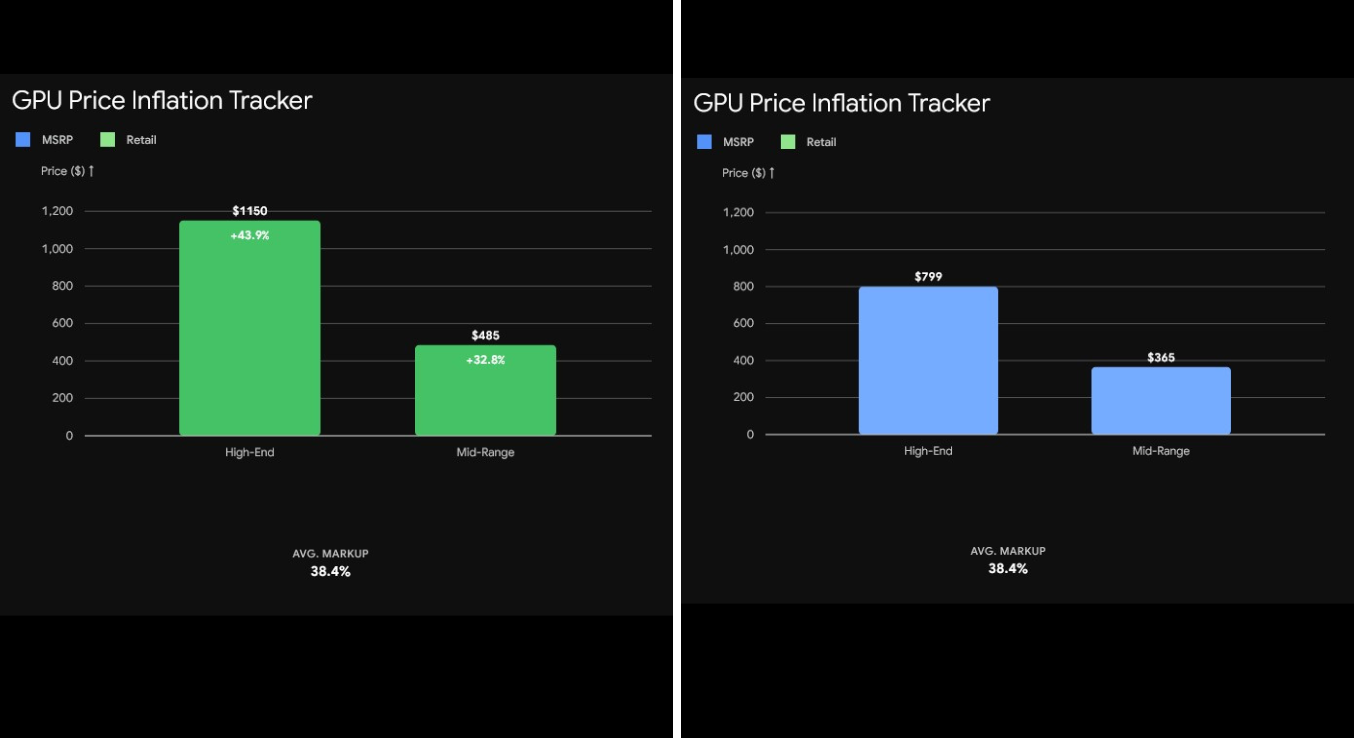
The RTX 5060 is a particularly striking example. This mid-range graphics card, commonly regarded as a sensible choice for 1080p and 1440p gaming, had been selling for roughly $365 on average. Then, almost without warning, its lowest asking price surged to approximately $485.
That’s an increase of about $120, translating to roughly 33%.
For someone assembling a gaming PC with a carefully measured budget, that isn’t pocket change. An extra $120 could determine whether the buyer keeps a stronger processor, adds more storage, upgrades another component, or abandons the original budget altogether.
So what is behind this abrupt movement? More importantly, why can GPU prices leap so dramatically when there isn’t an obvious worldwide shortage of graphics cards?
Supply and Demand: Something Doesn’t Add Up
The conventional explanation for a sudden hardware-price escalation is fairly straightforward. Demand rises sharply, supply contracts, or both happen simultaneously.
Yet that tidy explanation doesn’t always fit what shoppers see.
What Is Driving GPU Prices Higher?
The current movement in GPU pricing is being attributed to retail behavior rather than a simple lack of GPU chips.
That distinction matters.
A higher retail price does not automatically mean that retailers have exhausted their inventory.
When manufacturers or distributors announce even modest wholesale-price changes, retailers may swiftly recalibrate their listings. Existing stock, however, could have been purchased when prices were lower.
That creates an unusual dynamic. A retailer may still be selling hardware acquired at the previous cost while charging customers according to the newer market environment.
For shoppers, the effect can feel rather lopsided. The number on the product page changes immediately, while the retailer’s underlying acquisition cost may not have increased by anything close to the same amount.
Warning: Don’t automatically interpret an inflated GPU price as proof of a genuine shortage. Compare several retailers, inspect historical pricing, and check the manufacturer’s suggested retail price before opening your wallet.
Retail Scalping Is Becoming More Sophisticated
The word “scalping” usually conjures up the familiar image of an individual buying several graphics cards and flipping them through a marketplace at an inflated price.
Retail pricing can produce a surprisingly similar outcome, only on a considerably broader scale.
The Illusion of Competition
A functioning retail market is supposed to reward competition. If one retailer sets an excessive price, another seller should have an incentive to offer the same product for less.
That’s the basic mechanism.
Online retailers, however, watch competing listings closely. When a major seller raises the price of a graphics card, rival stores can adjust their own listings with remarkable speed.
The resulting pattern can resemble coordinated pricing, even when there is no formal agreement between the businesses.
The sequence is relatively simple:
- Distributor Pricing: May remain comparatively stable for inventory already in the channel.
- Existing Stock: Can be repriced according to prevailing market conditions.
- Retail Pricing: May climb quickly when sellers believe customers will tolerate the increase.
- Consumer Power: Diminishes as the overall cost of building a PC climbs.
This dynamic helps explain why finding a desirable graphics card at MSRP can feel like hunting for a needle in a haystack when the market becomes turbulent.
GPU Price Comparison
The figures below demonstrate just how quickly seemingly modest pricing changes can snowball:
| GPU Tier | Average MSRP | Current Retail Price | Price Increase |
|---|---|---|---|
| Entry Level | $250 | $310 | 24% |
| Mid-Range (RTX 5060) | $365 | $485 | 33% |
| High-End | $800 | $1,050 | 31% |
| Enthusiast | $1,599 | $2,100 | 31% |
The mid-range segment deserves particular attention because it is where a substantial number of mainstream PC builders tend to shop. Adding $120 to a $365 graphics card is enough to distort an entire component list.
Suddenly, the builder may have to settle for a weaker processor, trim storage capacity, select a less expensive motherboard, or simply put the project on ice.
How to Find a Good Graphics Card Without Overpaying
There is, fortunately, no rule saying you must accept the first price you encounter.
A modest amount of patience can go a surprisingly long way.
1. Track Price History
Never evaluate a deal solely by looking at today’s number.
Price-history websites and browser extensions can reveal what the same graphics card was selling for several weeks or months earlier. If the price has abruptly jumped by $100 or $120 overnight, that’s a sensible moment to stop and investigate.
A listing marked “sale” or “limited stock” isn’t automatically a bargain.
2. Check Manufacturer Pricing
Whenever possible, compare retail listings with the manufacturer’s official pricing.
Founders Edition cards and products sold through established board partners can offer useful benchmarks. Even when the exact MSRP model isn’t available, understanding its intended price gives you a much clearer picture of how substantial the current markup actually is.
3. Consider Bundles
Some retailers package a graphics card with a motherboard, power supply, or another PC component.
At first glance, the GPU may appear disproportionately expensive. But if you already need the additional hardware, judge the proposition by calculating the total system cost rather than isolating every component.
There is a catch, though: don’t purchase hardware you don’t need merely because a bundle makes the graphics card appear inexpensive.
4. Use Stock Alerts
Stock-alert communities can become extremely useful when GPU prices are behaving erratically.
Discord groups, price trackers, and social-media alerts can tell you when a graphics card returns to a more reasonable price.
The crucial part is deciding your target price before the notification arrives.
Otherwise, seeing those two words — “in stock” — can be enough to trigger an impulsive Buy Now click.
The Used GPU Market Is Worth Considering
When new graphics cards climb well above MSRP, the second-hand market becomes considerably more intriguing.
A used RTX 4060, RX 7600, or another previous-generation card can offer excellent value when it comes from a trustworthy seller and remains in sound condition.
Still, buying used hardware demands a little more diligence.
Ask about the card’s age, warranty, usage history, and operating temperatures. If circumstances allow, test the GPU yourself before handing over your money.
Be particularly mindful of cards that have spent substantial time mining cryptocurrency. Mining alone doesn’t prove that a graphics card is defective, but prolonged high-load operation makes the card’s history more consequential when you’re assessing its condition.
Your PC Can Be More Than a Gaming Machine
There is another perspective worth considering when expensive PC hardware enters the equation.
A powerful computer isn’t merely a gaming appliance. It can also function as a productivity workstation.
Video editing, 3D rendering, game development, streaming, animation, programming, and numerous other workloads can exploit capable CPU and GPU hardware. For someone who already possesses the skills to monetize those activities, a computer can potentially earn money and help offset its own cost.
For example, a community member known as Sharma reportedly used their system to generate a $2,625 win.
The broader point is straightforward: expensive hardware becomes easier to justify when it performs useful work beyond gaming.
That doesn’t mean every high-priced GPU should be treated as an investment. It simply means buyers should think about how much practical value they can actually extract from the machine.
What Should You Do Right Now?
If you’re assembling a gaming PC and encounter a sudden GPU price spike, don’t panic-buy.
Start by checking the card’s historical price. Compare several retailers. Investigate alternative GPUs, previous-generation models, used hardware, and even pre-built systems.
Above all, establish your budget before you begin shopping.
If you’ve decided that $400 is the absolute ceiling for your graphics card, an RTX 5060 listed at $485 doesn’t magically transform your budget into $485.
It means you may need another graphics card.
Key Takeaways
- The RTX 5060 example illustrates how rapidly GPU pricing can move, rising from approximately $365 to $485.
- An elevated retail price does not, by itself, establish that there is a genuine supply shortage.
- Retailers can reprice existing inventory when wholesale announcements or broader market conditions shift.
- Price-history tools can expose unusually steep increases that might otherwise look normal.
- Manufacturer pricing and established board partners can provide useful reference points when judging a markup.
- Used and previous-generation graphics cards can become considerably more attractive when current models are heavily inflated.
- Pre-built systems can occasionally provide stronger overall value because system integrators purchase components in bulk.
- A powerful PC can serve professional purposes such as video editing, 3D rendering, game development, and streaming.
Frequently Asked Questions
1. Why did the RTX 5060 suddenly become more expensive?
A sudden retail increase can occur when sellers react to market expectations, wholesale-price announcements, or competing retailers’ listings. A higher asking price alone does not establish that there is a physical shortage of GPUs.
2. What is retail scalping?
Retail scalping describes the practice of selling products at substantially inflated prices during periods of strong demand or perceived scarcity. It resembles traditional scalping, except the elevated price appears through established retail channels.
3. Is there actually a GPU shortage?
A price increase by itself isn’t enough to prove a shortage. Buyers should examine inventory, availability across several retailers, historical prices, and manufacturer pricing before reaching that conclusion.
4. How can I find the best graphics card without overpaying?
Monitor prices over time, compare multiple retailers, check MSRP, investigate previous-generation GPUs, and consider reputable used cards. Stock alerts can also help you react when prices return to a more reasonable level.
5. Are distributors raising prices?
Not necessarily. Depending on the circumstances, distributors may continue selling existing inventory at earlier prices while retailers independently alter their margins and final selling prices.
6. Why do different retailers sometimes have nearly identical prices?
Retailers closely monitor competing listings. If one seller raises its price, others may follow rather than leave potential revenue on the table. The result can be synchronized pricing without necessarily demonstrating formal coordination.
7. Is an Nvidia graphics card worth buying at an inflated price?
That depends on your requirements and financial limits. Someone who urgently needs the GPU for professional work may consider the premium defensible. For a gaming-only build, waiting for a better price is often the more sensible move.
8. Should I buy a used graphics card?
A used GPU can be an excellent bargain, especially when new cards carry substantial markups. Before purchasing, verify its condition, warranty, usage history, and performance.
9. What is a recommended graphics card for budget builders?
The RTX 4060 and RX 7600 can remain compelling choices when sold at sensible prices. The better option ultimately depends on current pricing and the games or applications you intend to run.
10. Can I still build a PC on a strict budget?
Absolutely. You may need to explore previous-generation hardware, used components, an APU, or a pre-built machine. The objective should be maximizing performance per dollar rather than automatically selecting the newest component.
11. How do I know if I am paying too much?
Begin with the official MSRP. Then compare it against historical street prices from multiple retailers. A substantial gap between the normal market price and today’s listing is a strong reason to investigate before purchasing.
12. Will GPU prices come down?
They can. Prices may become more competitive when supply improves, demand softens, newer generations arrive, or retailers begin clearing inventory.
What nobody can promise is precisely when a particular GPU will return to its former price.
13. Are pre-built PCs a better deal?
Sometimes.
System integrators buy hardware in volume, allowing them in certain circumstances to sell complete machines at surprisingly competitive prices. Always examine the complete specification rather than judging the machine solely by its graphics card.
14. Which graphics card brands are most affected?
Both Nvidia and AMD products can experience retail markups. Popular, high-demand models are generally more susceptible because sellers know that some buyers will tolerate a premium.
15. How can my PC generate income?
A capable computer can support freelance video editing, 3D modeling, animation, game development, streaming, content creation, and other forms of digital work.
The important ingredient isn’t simply owning powerful hardware. You also need a skill or service that people are willing to pay for.
Final Thoughts
One of the easiest mistakes to make during a GPU price spike is assuming that today’s price represents the new normal.
It may not.
The graphics-card market can turn on a dime. A model that appears absurdly overpriced today may become a reasonable purchase later, while a completely different card could suddenly emerge as the better bargain.
So before committing hundreds of dollars to a graphics card, take a breath. Examine its price history. Compare alternatives. Calculate the cost of the complete build.
And if the numbers still don’t add up, walk away.
There will always be another GPU.
If you are looking for a budget pc then you can check out this post https://partsofpc.com/build-gaming-pc-under-1000usd-no-bottlenecks/